
What is a public_html folder?

The public_html folder is the document root for your primary domain name. This is where you put all website files you want to appear when someone types your main domain (the domain name you provided when you signed up for a hosting plan at HostGator).

When users visit your website, whatever is in the public_html folder will be shown to them in their browser. The public_html is the folder (or directory) where you would want to keep all website files you want to be pulled up when a user visits your website. For example, if you have a file called index.html, or any of the other default file names in the public_html folder, it will display that page.


Where is my public_html folder located?

The public_html folder is located within the File Manager of your cPanel.
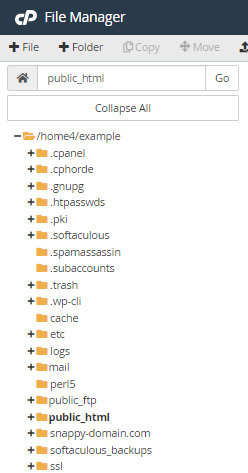
Home Directory


  • 0 Users Found This Useful
Was this answer helpful?

Related Articles

Do you have Softaculous?

Yes, Softaculous is included with each Dedicated hosting plan. Softaculous has over 300 scripts...

Do you offer free SSL certificates?

Yes, We currently utilize AutoSSL from cPanel, this automatically installs free SSL certificates...

How to force SSL with .htaccess

You can force an HTTPS connection on your website by adding these rules in your website's...

Is a website builder included?

Yes, all cPanel accounts have access to it which is a drag and drop website builder. cPanel's...

Is an outbound email filtering service included?

es, we use MailChannels which is a 3rd party service that is specialized in outbound email...

Powered by WHMCompleteSolution